AI architecture · 13 min
Outborn Editorial
Outborn Agent Connect vs Pipedream, Composio and Arcade: which agent integration layer fits?
Compare Pipedream, Composio, Arcade and Outborn Agent Connect across managed auth, MCP gateways, tools, identity, approvals and governed execution.

AI agent integration platforms are converging fast. The category used to be easy to describe: one vendor gave developers connectors, another handled OAuth, another exposed tools to agents. In 2026, those boundaries are much less tidy.
Pipedream now positions itself directly as an integration layer for AI agents, with managed authentication, a large catalog of APIs and tools, MCP access and a managed runtime. Composio has expanded around agent tool discovery, per-user authentication, hosted MCP sessions and secure execution across a very broad toolkit catalog. Arcade has moved beyond individual authorized tools into MCP gateways, OIDC-backed user sources, contextual access and audit controls.
Outborn Agent Connect approaches the problem from a related but different direction: the connection layer is treated as the boundary between agent reasoning and governed execution. That includes MCP and providers, but also browser and trusted-device execution, scoped permissions, approvals and a handoff into a separate governance layer.
The most useful comparison is not “who has the most connectors?” It is “what operating responsibility does each platform take ownership of between the agent and the system it wants to use?”
At a glance
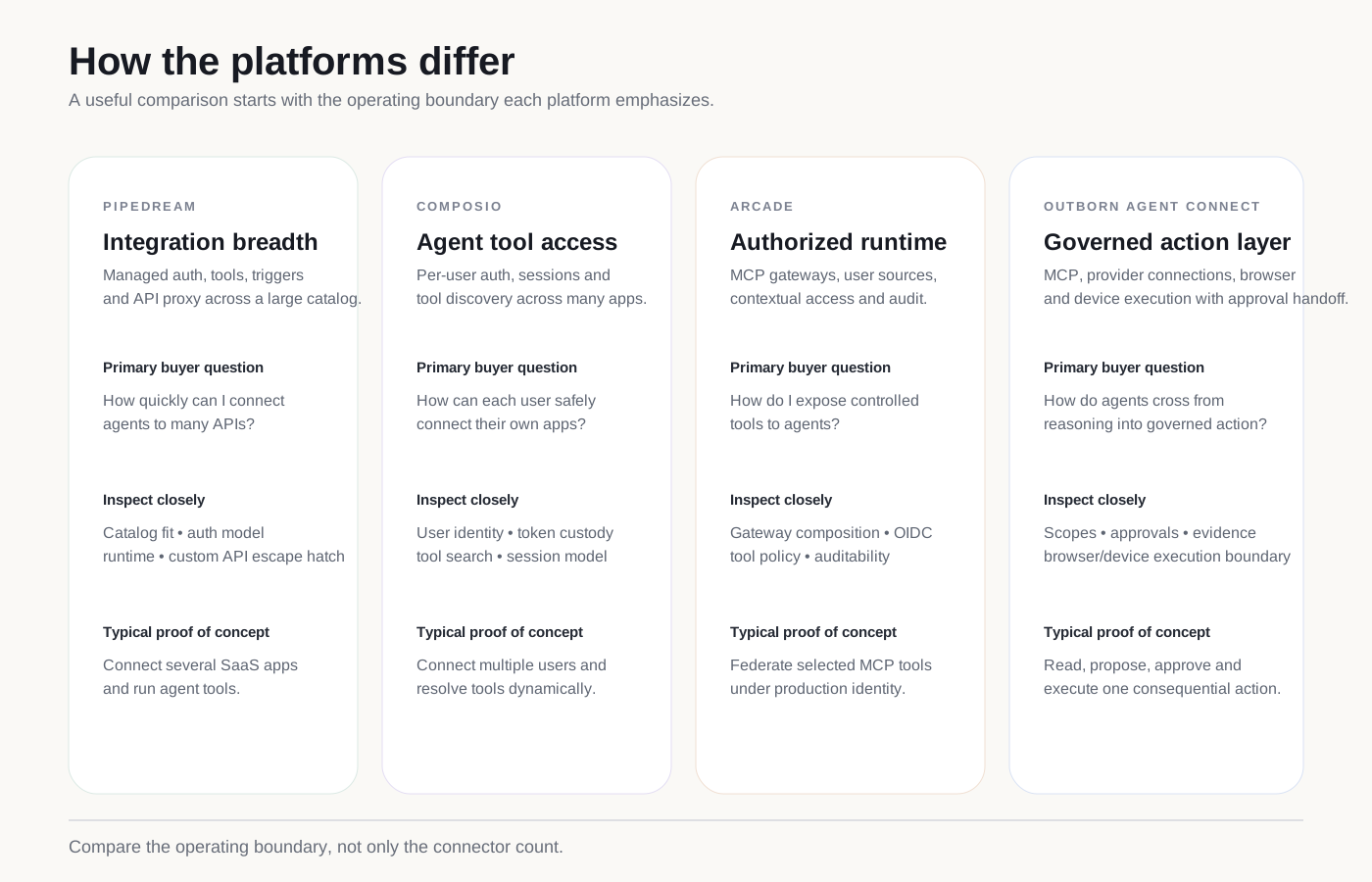
| Platform | Center of gravity | Strong starting point | What to validate in a proof of concept |
|---|---|---|---|
| Pipedream | Integration breadth and managed API access | Agents that need many SaaS/API integrations quickly | catalog fit, auth lifecycle, MCP/API proxy model, custom API escape hatch |
| Composio | Per-user app access and agent tool sessions | Products where many end users connect their own apps | user identity mapping, token custody, tool discovery, session behavior |
| Arcade | Authorized tool runtime and MCP gateway control | Agents that need federated MCP tools with explicit identity and access control | gateway composition, OIDC/user source, contextual policies, audit |
| Outborn Agent Connect | Governed connection and execution boundary | Enterprise agents that move from reasoning into controlled action | provider scopes, approvals, browser/device execution, governance evidence |
The four products overlap. Each now supports more than one of these responsibilities. The distinction is where the product is deepest and what it expects the surrounding architecture to provide.
Why connector count is the wrong primary metric
A large connector catalog is valuable. It reduces the amount of OAuth, API-client and schema work a team has to build itself.
But catalog size alone does not answer the production questions that appear as soon as an agent can take action:
- Which human or service identity is the agent acting for?
- Where do credentials live?
- How are tokens refreshed?
- Which tools can this specific agent see?
- Can tool access differ by environment or user?
- Can the platform distinguish a read from a consequential write?
- What happens when an action needs approval?
- How is access revoked?
- What evidence remains after execution?
- Can the same control model apply to APIs, MCP, browsers and devices?
These questions expose the real operating boundary.
Pipedream: breadth, managed auth and integration infrastructure
Pipedream’s current positioning is direct: it calls itself “the integration layer for AI agents.” Its public site advertises managed authentication and more than 10,000 tools across more than 3,000 APIs.
For developers, that creates a clear value proposition. Instead of implementing OAuth flows, refresh-token storage, per-provider API quirks and action schemas, an application can use Pipedream Connect, its SDK, API proxy or remote MCP server.
Pipedream’s MCP developer documentation describes a hosted MCP server that exposes thousands of APIs and tools. It also supports end-user account connection, so an agent can call a tool as a specific user without the application storing that user’s provider tokens directly.
Where Pipedream is particularly compelling
- you need broad SaaS and API coverage quickly;
- developer velocity matters more than owning connector infrastructure;
- the agent needs both prebuilt actions and a lower-level API escape hatch;
- end users need to connect their own accounts;
- MCP is one of several ways your application may invoke integrations.
Pipedream also markets Conduit, an employee-oriented gateway with SSO, access policies, per-user permissions and audit capabilities. That indicates the company is moving beyond developer plumbing toward enterprise controls around agent access.
What to test, not assume
A production proof of concept should still examine:
- whether the specific APIs and actions you need are supported at the right depth;
- how identities map between your application and connected accounts;
- how permission changes propagate;
- how destructive or sensitive actions are represented;
- what audit detail is available;
- how custom/internal APIs fit beside the catalog.
Pipedream’s strength is not simply “many connectors.” It is that it packages a significant part of integration infrastructure behind a developer-oriented interface.
Composio: per-user tools, managed authentication and agent sessions
Composio’s documentation now describes a platform for giving agents tools, managed authentication and secure execution across 1,500+ apps.
The central concept is user-oriented. A user is the person your agent acts on behalf of, identified by a stable user ID from your application. That user connects Gmail, GitHub, Slack or other accounts, and Composio stores and refreshes the credentials associated with that user.
This model is especially natural for SaaS products building multi-tenant agents.
The session model matters
Composio increasingly organizes agent access around sessions. A session can expose selected toolkits, connected accounts and tools to an agent. It can also be surfaced through hosted MCP.
The product also emphasizes tool discovery. Instead of exposing an enormous flat tool list to the model, an agent can search for the tools relevant to the current task.
That matters because large tool catalogs can create a different problem: tool selection becomes part of the reasoning challenge.
Where Composio is particularly compelling
- your product serves many end users;
- each user connects their own application accounts;
- you want managed OAuth and credential refresh;
- your agent should discover tools dynamically;
- you want one session abstraction across several applications;
- you want the same connected-account model available through MCP and framework SDKs.
What to validate
Focus on:
- token custody and your required deployment model;
- user identity and tenant isolation;
- which toolkits have managed OAuth;
- how shared connections are controlled;
- how tool search behaves under realistic workloads;
- how custom tools and remote MCP servers coexist with Composio-managed tools;
- what execution evidence is available for high-impact actions.
Composio’s center of gravity is not a traditional workflow builder. It is the agent-to-app access layer organized around users, sessions and tools.
Arcade: authorization, MCP gateways and runtime governance
Arcade’s current platform has moved notably toward enterprise MCP infrastructure.
Its MCP Gateway documentation describes federating tools from multiple MCP servers into one endpoint, selecting exactly which tools are exposed, and using different gateway configurations for different agent workloads.
For production identity, Arcade recommends a User Source backed by the organization’s OIDC identity provider. Its operating guidance also includes Contextual Access and audit logs.
That puts Arcade close to the problem many enterprise platform teams actually have: not merely “how can my agent call tools?” but “how do I expose a controlled set of tools to authenticated users and agents?”
Where Arcade is particularly compelling
- you use MCP-compatible clients or agents;
- you need to federate tools from multiple MCP servers;
- tool visibility should differ by gateway or workload;
- users should authenticate through enterprise identity;
- tool calls require managed authorization;
- you need runtime access controls and auditable administration.
Arcade also lets teams mix Arcade-hosted tools, custom deployed tools and registered remote MCP servers within a gateway.
The key architectural idea
Arcade makes the gateway itself a meaningful policy surface.
That is different from simply giving the agent a URL containing every available tool. A team can deliberately construct a gateway for a specific agent, project or use case.
This reduces tool sprawl and can make authorization easier to reason about.
What to validate
- how your OIDC identity maps into gateway users;
- how contextual policies are authored and evaluated;
- what is captured in audit logs;
- how tool-level authorization behaves after revocation;
- how remote MCP-server failures propagate;
- how gateways are promoted across environments;
- what happens when a single agent needs tools from many gateways.
Arcade’s current position is therefore closer to an authorized actions runtime and MCP control plane than a simple tool library.
Outborn Agent Connect: the execution boundary inside a wider platform
Outborn Agent Connect is designed around a broader question:
How should an AI agent cross from reasoning into real systems without giving the reasoning layer unrestricted authority?
The product is the connection and execution layer within the Outborn platform.
Its scope includes:
- provider connections and managed credentials;
- MCP servers and tool exposure;
- APIs and application integrations;
- browser execution;
- trusted-device capabilities;
- scoped permissions;
- approval-aware actions;
- execution activity and evidence handoff.
Outborn Account provides human identity and organization membership. Outborn Agent Platform provides the agent runtime, reasoning and orchestration. Outborn Governance holds policy, approval state, risk and evidence.
The separation is deliberate: the service that reasons does not have to be the service that owns the credential, decides policy and stores governance evidence.
Why browser and device execution change the comparison
API integrations cover a large portion of enterprise work, but not all of it.
Some applications have no useful API. Some workflows depend on a browser. Some actions happen on a managed workstation or local application. Some operational tasks require interacting with a trusted device.
That changes the risk model.
An agent clicking in a browser or operating a desktop cannot be governed solely by API scopes. The control layer needs to think about:
- which device is trusted;
- which capabilities are enabled;
- whether pointer/keyboard control is allowed;
- whether the action is read-only or destructive;
- whether the target application is expected;
- whether the user must approve the proposed action.
This is one reason Outborn Agent Connect’s target boundary is wider than “integration catalog.”
A practical architecture comparison
The key design choice is which of these responsibilities belong inside one service and which should remain separate.
Pipedream, Composio, Arcade and Outborn answer that question differently.
Compare by trust boundary, not marketing category
| Trust boundary | Pipedream | Composio | Arcade | Outborn Agent Connect |
|---|---|---|---|---|
| End-user app authentication | Managed auth and connected accounts | Core per-user authentication model | Auth providers and user sources | Provider connections tied to Outborn identity/application context |
| Tool discovery | Large action/tool catalog | Strong session/tool discovery emphasis | Gateway tool selection | Provider/MCP catalog with scoped capability exposure |
| MCP | Hosted remote MCP | Hosted MCP sessions and custom MCP | MCP gateways as a major operating surface | MCP gateway within the wider action layer |
| Custom/internal systems | API proxy and developer integrations | Custom tools, toolkits and MCP | Custom/remote MCP servers | Providers, MCP, browsers, trusted devices |
| Runtime authorization | Expanding enterprise controls | User/account/session boundaries | Contextual access and tool auth | Scoped permissions plus approval-aware execution |
| Governance handoff | Platform-specific logs/audit capabilities | Execution/session evidence | Audit logs and access governance | Separate Outborn Governance control/evidence layer |
This table is intentionally descriptive rather than a score. The implementation quality of each capability matters more than a checkmark.
The proof of concept that exposes the differences
Do not evaluate these platforms with a single “send a Slack message” demo.
Use one workflow with both low-risk and high-risk actions.
Suggested test
- Create two users in your application.
- Connect each user to different SaaS accounts.
- Add one remote MCP server.
- Add one internal API or custom tool.
- Expose only a subset of available actions.
- Ask the agent to perform a read.
- Ask it to perform a normal write.
- Ask it to perform a high-impact write.
- Require approval for the high-impact action.
- Revoke one user’s connection and repeat the request.
- Inspect the complete execution and audit history.
- Simulate an upstream provider outage.
The setup friction and resulting evidence will tell you more than a catalog-size comparison.
Best practice: include revocation and failure in the proof of concept. Integration platforms look similar when every credential is valid and every provider responds normally.
Which platform should you evaluate first?
Start with Pipedream when
- integration breadth is the dominant problem;
- your developers want managed auth and a large tool/action catalog;
- API proxy access is valuable;
- you need to connect many SaaS products rapidly.
Start with Composio when
- you are embedding agents in a multi-user SaaS product;
- per-user connected accounts are the core abstraction;
- dynamic tool discovery matters;
- hosted MCP sessions fit your agent architecture.
Start with Arcade when
- MCP is a primary enterprise integration surface;
- you need deliberate gateway composition;
- enterprise user identity should come from OIDC;
- contextual tool access and audit are central requirements.
Start with Outborn Agent Connect when
- the same agent platform must reach APIs, MCP, browsers and trusted devices;
- credentials should stay outside the reasoning runtime;
- execution permissions should be scoped;
- consequential actions should become approval-aware;
- governance evidence needs to remain connected to execution.
Evaluate more than one when
Your architecture has two first-class problems.
For example, a product may use a specialized integration provider for long-tail SaaS coverage while keeping enterprise execution policy in a separate control layer. The decision should follow the trust boundary rather than a desire to force every responsibility into one vendor.
Common evaluation mistakes
Mistake 1: treating all connectors as equal
A connector that supports one read action is not equivalent to a connector with complete OAuth, pagination, webhooks, writes, schemas and stable maintenance.
Validate the operations you actually need.
Mistake 2: ignoring user identity
An agent tool call without a clear human/service identity becomes difficult to govern later.
Test multi-user isolation early.
Mistake 3: exposing every tool to the model
Large tool lists consume context and can make tool selection less reliable.
Gateway composition and dynamic tool discovery are important architectural capabilities, not cosmetic features.
Mistake 4: testing approval only in the UI
Approval should bind to a concrete proposed action: target, parameters, identity, environment and scope.
Otherwise the user may approve one thing while the runtime executes another.
Mistake 5: checking audit after the architecture is finished
Evidence requirements should shape the execution design from the beginning.
If your team cannot later answer who asked, what the agent proposed, what was approved, which credential executed it and what happened, the system will be difficult to operate safely.
Bottom line
Pipedream, Composio, Arcade and Outborn Agent Connect are all responding to the same structural shift: agents need a production-grade way to reach the systems where work happens.
But they are not simply four versions of the same connector marketplace.
Pipedream emphasizes integration breadth and developer infrastructure. Composio emphasizes per-user application access and agent tool sessions. Arcade emphasizes authorized tools and controlled MCP gateways. Outborn Agent Connect is designed as the governed action boundary inside a wider enterprise agent platform.
The practical buying question is therefore:
Which operating responsibilities do you want your connection layer to own—and which trust boundaries must remain explicit around the agent?
Sources
Product capabilities change quickly. Confirm current documentation and run a proof of concept against the exact actions, identity model and governance requirements your organization needs.
这篇文章有帮助吗?
发表评论
评论提交后公开显示,随后接受审核。
订阅 Outborn 动态
通过电子邮件获取新文章和实用观点。